DELL CN-0FMY1T-13740-33L-00CW-A03 Idrac Pcie Network Card Controller 5-PORT RJ-45 Ethernet
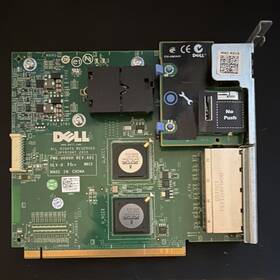
( Brand: Dell ), ( Manufacturer Part Number: CN-0FMY1T-13740-33L-00CW-A03 ), ( Part Type: Network Controller Card ), ( Compatible Brand: For Dell ), ( Connectors: Rj-45 ), ( Item Height: 3.1 In ), ( Network Ports: Ethernet ), ( Item Length: 6.7 In ), ( Compatible Port: Pci Express ), ( Item Width: 4.4 In ), ( Product Line: Idrac )
Review DELL Idrac Pcie Network Controller Card 5-port Ethernet Cn-0fmy1t
The **Dell CN-0FMY1T-13740-33L-00CW-A03 iDRAC PCIe Network Controller Card (5-Port RJ-45 Ethernet)** is a high-performance, enterprise-grade add-on card designed to enhance the network connectivity and remote management capabilities of Dell PowerEdge servers. Engineered for mission-critical environments, this card integrates seamlessly with Dell s integrated Dell Remote Access Controller (iDRAC) technology, providing administrators with robust, out-of-band (OOB) access to server resources even when the operating system is unavailable or experiencing downtime. Built on a PCIe (Peripheral Component Interconnect Express) interface, the card delivers low-latency, high-bandwidth connectivity, ensuring reliable communication for virtualization, cloud computing, and data center automation tasks.
Featuring **five dedicated RJ-45 Ethernet ports**, this controller card offers redundant and scalable network redundancy options, allowing for failover protection and load balancing to minimize single points of failure. Each port supports **Gigabit Ethernet (1 Gbps)** speeds, enabling high-throughput data transfer for applications requiring consistent, high-bandwidth performance, such as virtual desktop infrastructure (VDI), storage area networks (SAN), or high-performance computing (HPC) workloads. The card s **dedicated management network** isolates traffic from the primary server network, reducing congestion and improving security by preventing unauthorized access to management functions.
Beyond its networking capabilities, the iDRAC PCIe card integrates with Dell s **iDRAC Enterprise** or **iDRAC Standard** firmware, providing advanced remote management features such as **virtual console access, firmware updates, power control, and hardware monitoring** all accessible via a web-based interface, SSH, or RESTful APIs. This level of control is invaluable for IT administrators managing distributed data centers, enabling remote troubleshooting, patch management, and proactive maintenance without physical server access. The card s **low-profile PCIe form factor** ensures compatibility with a wide range of Dell PowerEdge servers, including models like the R740, R750, R640, and R7525, making it a versatile upgrade option for existing infrastructure.
Security is a cornerstone of this controller card, with support for **Secure Boot, Trusted Platform Module (TPM) 2.0, and hardware-based encryption** to safeguard sensitive management data. Additionally, the card s **dedicated management processor** ensures that critical functions remain operational even if the server s primary CPU or OS fails, enhancing reliability in critical environments. Whether deployed in a traditional data center, a hyper-converged infrastructure, or a cloud-based deployment, this iDRAC PCIe network controller card delivers a balance of performance, scalability, and manageability, making it an essential component for modern IT environments demanding high availability and efficient remote administration.
### **Pros and Cons of buying a Dell CN-0FMY1T-13740-33L-00CW-A03 (iDRAC PCIe Network Controller Card, 5-Port RJ-45 Ethernet)**
#### **Pros:**1. **Enhanced Remote Management** This card integrates with Dell s iDRAC (Integrated Dell Remote Access Controller), providing advanced remote server management, monitoring, and troubleshooting capabilities. This is particularly useful for data centers, cloud environments, and IT administrators who need remote access without physical presence.
2. **Dedicated Networking for iDRAC** The card includes five dedicated RJ-45 Ethernet ports, ensuring that iDRAC traffic does not compete with the server s primary network interface. This prevents bottlenecks and ensures reliable remote access even if the main network fails.
3. **Compatibility with Dell PowerEdge Servers** This card is designed specifically for Dell PowerEdge servers (likely Gen10 or Gen11 models), ensuring seamless integration with existing hardware and software ecosystems. It supports features like virtualization, virtual console access, and secure remote access protocols (SSH, HTTPS, etc.).
4. **Improved Security and Isolation** By separating iDRAC traffic onto its own network interface, the card reduces the risk of security breaches or performance degradation caused by malicious traffic on the primary network. It also supports features like IPMI (Intelligent Platform Management Interface) for enhanced security controls.
5. **Future-Proofing and Scalability** The PCIe form factor allows for easy installation in existing server configurations. Additionally, the five-port design provides flexibility for connecting multiple devices (e.g., monitoring tools, virtual consoles, or additional management interfaces) without overloading a single network port.
6. **Reduced Downtime** With remote access capabilities, administrators can diagnose and resolve issues without physical on-site visits, minimizing downtime for critical servers.
7. **Support for Advanced Features** The card supports features such as:- **Virtual Console Access** (via browser or third-party tools like Dell EMC OpenManage).
- **KVM-over-IP** for remote keyboard, video, and mouse control.
- **Firmware updates and BIOS management** remotely.
- **Integration with Dell s OpenManage Enterprise** for centralized management of multiple servers.
8. **Cost-Effective for Large Deployments** While the upfront cost may be higher than a basic NIC, the long-term benefits (reduced downtime, improved security, and remote management) make it cost-effective for enterprises with multiple servers.
---
#### **Cons:**1. **Higher Upfront Cost** Compared to a standard network interface card (NIC), this card is significantly more expensive. For small businesses or single-server setups, the cost may not justify the features.
2. **Overkill for Basic Use Cases** If the server does not require remote management or if the primary network interface is sufficient for all needs, this card is unnecessary. A standard NIC or even the built-in iDRAC network port (if available) may suffice.
3. **Complexity for Non-IT Users** Configuring and managing iDRAC requires technical knowledge. Non-technical users or small businesses without dedicated IT staff may find the setup and maintenance challenging.
4. **Potential for Redundancy** Some Dell servers already include a built-in iDRAC network port or a shared management interface. Adding this card may create redundancy, complicating network management if not properly isolated.
5. **PCIe Slot Occupancy** The card occupies a PCIe slot, which could otherwise be used for additional NICs, GPUs, or other expansion cards. In servers with limited PCIe slots, this may be a trade-off.
6. **Licensing Costs for Advanced Features** While basic iDRAC functionality is included, some advanced features (e.g., virtualization support, full KVM-over-IP, or enterprise-grade monitoring) may require additional licensing or subscriptions (e.g., Dell EMC OpenManage Enterprise).
7. **Potential for Misconfiguration** Improperly configuring the iDRAC network or isolating it incorrectly could lead to connectivity issues or security vulnerabilities. Requires careful planning during deployment.
8. **Limited Longevity for Non-Enterprise Environments** If the server is not part of a large infrastructure, the benefits of iDRAC may not be fully utilized, making the investment less justified over time.
---
### **Conclusion:**The **Dell CN-0FMY1T-13740-33L-00CW-A03 iDRAC PCIe Network Controller Card** is a **highly specialized and valuable component for enterprise environments** where remote server management, security, and reliability are critical. It excels in data centers, cloud deployments, and IT infrastructures requiring 24/7 monitoring and administration. The five-port design ensures dedicated and isolated network access for iDRAC, reducing risks and improving performance.
However, for **small businesses, single-server setups, or non-critical environments**, the cost and complexity may not be justified. In such cases, a standard NIC or the server s built-in iDRAC network port may be sufficient.
### **Recommendation:** - **Buy this card if:**- You manage a **data center, cloud infrastructure, or multiple critical servers**.
- You require **remote hands-free access, advanced monitoring, or secure KVM-over-IP**.
- Your budget allows for the **upfront investment** in exchange for long-term reliability and reduced downtime.
- You need **dedicated iDRAC networking** to avoid conflicts with the primary network.
- **Avoid this card if:**- You are running a **small business or home lab** with minimal remote management needs.
- The server already has **sufficient built-in iDRAC networking** without requiring additional ports.
- You lack the **technical expertise** to configure and maintain iDRAC effectively.
- The **cost outweighs the benefits** for your specific use case.
For most **enterprise-grade deployments**, this card is a **strong investment** that enhances operational efficiency and security. For other users, evaluating alternatives (such as a basic NIC or shared iDRAC networking) may be more practical.
Details:
Dell iDRAC PCIe Network Controller Card, 5-Port RJ-45 Ethernet CN-0FMY1T.
part #: cn-0fmy1t-13740-33l-00cw-a03 prices
- $9.99-$49.99
specifications diskcontrolle:
- brand: Dell
- mpn: Cn-0fmy1t-13740-33l-00cw-a03
- part type: Network Controller Card
- compatible brand: For Dell
- connectors: Rj-45
- item height: 3.1 In
- network ports: Ethernet
- item length: 6.7 In
- compatible port: Pci Express
- item width: 4.4 In
- product line: Idrac
payments diskcontrolle:
- other
- wallet: Google-pay
- credit card: Discover
general diskcontrolle:
- Enterprise Networking, Servers > Server Components > Disk Controllers/RAID Cards
- condition: Used
shipping diskcontrolle:
- type: Calculated
- transit: 5-11 Days
- service: USPS Ground Advantage
- carrier: USPS
- class: Standard
- cost: $5.89
offer diskcontrolle:
- started: June 7, 2026
- quantity: 1
- best offers: True
- availability: In Stock
- options: Ship-to-home
- sold: 0
seller diskcontrolle:
- city: Toledo, Ohio
- rating: 100.0%
- # reviews: 38
returns diskcontrolle:
- policy: No Returns
Dell RJ-45 Is Similar To:
- 0.012114348866074875 Dell Perc Sas Raid Controller Battery Cables (33.9% similar) I'll get back to you as soon I can. Condition: used, working if a power adapter is required for this item, it not included cord shows signs of normal use w some scuffs scratches blemishes sticker residue no other accessories hardware software...(October 13th, 2018)
- 0.090952716287521 Dell Raid Controller Card Battery (38.4% similar) I'll get back to you as soon I can. Condition: used, working if a power adapter is required for this item, it not included cord shows signs of normal use w some scuffs scratches blemishes sticker residue no other accessories hardware software...(May 11th, 2018)
- 0.09303761270926691 Dell Sas Pcie Hba Adapter Card Qty (31.2% similar) Condition: used, working if a power adapter is required for this item, it not included cord shows signs of normal use w some scuffs scratches blemishes sticker residue no other accessories hardware software. I'll get back to you as soon I can...(May 25th, 2018)
- 0.11192593339700618 Dell Poweredge Sas Raid Controller Perc Card Battery Cable (34.8% similar) Condition: used, working if a power adapter is required for this item, it not included cord shows signs of normal use w some scuffs scratches blemishes sticker residue no other accessories hardware software. I'll get back to you as soon I can...(August 1st, 2018)
- 0.16846368637021225 Dell Poweredge Perc Sas Raid Controller Card Battery Cables (36.9% similar) I'll get back to you as soon I can. Condition: used, working if a power adapter is required for this item, it not included cord shows signs of normal use w some scuffs scratches blemishes sticker residue no other accessories hardware software...(June 27th, 2018)
- 0.21310806238776236 Dell Perc Sas Raid Controller Battery Ram Qty (33.9% similar) Condition: used, working if a power adapter is required for this item, it not included cord shows signs of normal use w some scuffs scratches blemishes sticker residue no other accessories hardware software. I'll get back to you as soon I can...(March 10th, 2018)
- 0.2548422196094777 Dell Perc Sas Raid Controller Battery Cable (34.6% similar) Condition: used, working if a power adapter is required for this item, it not included cord shows signs of normal use w some scuffs scratches blemishes sticker residue no other accessories hardware software. I'll get back to you as soon I can...(April 26th, 2018)
- 0.31396718087771713 Dell Perc Sas Raid Controller Card For Poweredge Battery (38.6% similar) If a power adapter is required for this item, it not included cord shows signs of normal use w some scuffs scratches blemishes sticker residue no other accessories hardware software. Condition: used, working, comes as shown. I'll get back to you as soon I can...(August 17th, 2018)
- 0.33236011367493234 Dell Perc Sas Raid Controller Battery Connection Cable (34.5% similar) Condition: used, working if a power adapter is required for this item, it not included cord shows signs of normal use w some scuffs scratches blemishes sticker residue no other accessories hardware software. I'll get back to you as soon I can...(September 26th, 2018)
- 0.3371404716388322 Dell Sas Pcie Hba Dual Port Adapter Card (27.7% similar) Condition: used, working if a power adapter is required for this item, it not included cord shows signs of normal use w some scuffs scratches blemishes sticker residue no other accessories hardware software. I'll get back to you as soon I can...(May 8th, 2018)
- 0.346283308649288 Dell Perc Sas Raid Controller Battery Cable (34.8% similar) I'll get back to you as soon I can. Condition: used, working if a power adapter is required for this item, it not included cord shows signs of normal use w some scuffs scratches blemishes sticker residue no other accessories hardware software...(June 27th, 2018)