NVIDIA 030-2378-001 Quadro Fx Graphics Card 3800
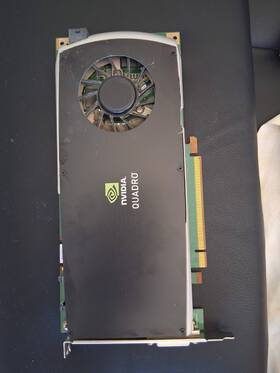
( Brand: Nvidia ), ( Manufacturer Part Number: 030-2378-001 ), ( Part Type: Card )
Review NVIDIA Quadro Fx Graphics Card
The **NVIDIA Quadro FX 3800 (Model 030-2378-001)** is a high-performance professional graphics card designed to deliver uncompromising visual fidelity, computational power, and reliability for demanding workstation applications. Engineered for architects, engineers, animators, and designers who require seamless rendering, precise 3D modeling, and real-time visualization, this card represents NVIDIA s commitment to bridging the gap between raw graphics processing and professional-grade productivity. Built on the **G80 architecture**, the Quadro FX 3800 features a **256-bit memory interface** paired with **512MB of GDDR3 memory**, ensuring smooth handling of high-resolution textures, complex simulations, and large-scale datasets without the bottlenecks of consumer-grade GPUs. Its **128-bit floating-point precision** and **CUDA-enabled cores** provide the computational muscle needed for advanced scientific computing, finite element analysis, and photorealistic rendering, making it a staple in industries where accuracy and performance are non-negotiable.
At its core, the Quadro FX 3800 is optimized for **OpenGL and DirectX compatibility**, ensuring seamless integration with professional software suites like **AutoCAD, Maya, 3ds Max, SolidWorks, and Adobe Creative Cloud**, where stability and driver support are critical. The card s **PCI Express 16x interface** guarantees robust connectivity to modern workstations, while its **dual DVI outputs** (one DVI-I and one DVI-D) accommodate high-definition displays up to **2560x1600 resolution**, catering to multi-monitor setups without sacrificing performance. Unlike consumer-oriented GPUs, the Quadro FX 3800 is engineered with **low-latency rendering** and **anti-aliasing support**, reducing visual artifacts in intricate 3D scenes and enhancing the precision of interactive workflows. Its **passive cooling design** minimizes operational noise and thermal interference, making it an ideal choice for office environments where silence and efficiency are prioritized.
Beyond its technical specifications, the Quadro FX 3800 embodies NVIDIA s philosophy of **professional-grade reliability**, with features like **error-correcting code (ECC) memory** to prevent data corruption during intensive workloads and **NVIDIA PureVideo HD** for hardware-accelerated video playback, reducing CPU load during media review sessions. This card is particularly well-suited for **CAD/CAM workflows**, where real-time ray tracing and dynamic shading are essential, as well as for **digital content creation**, where smooth previews and batch rendering are critical to maintaining workflow momentum. While newer architectures have since surpassed its capabilities, the Quadro FX 3800 remains a respected workhorse in legacy systems, offering a balance of performance, durability, and professional-grade features that continue to serve users in niche or budget-conscious environments where cutting-edge hardware isn t feasible. Its legacy status also makes it a sought-after component for enthusiasts restoring older workstations or those seeking a cost-effective upgrade for specialized applications.
The NVIDIA Quadro FX 3800 (part number 030-2378-001) is an older professional graphics card released in 2008, designed primarily for workstation applications like CAD, 3D rendering, and scientific computing. Below is a detailed breakdown of its pros and cons, followed by a conclusion and recommendation.
---
### **Pros of the NVIDIA Quadro FX 3800**
1. **Professional Driver Support**
The Quadro FX series was built for workstations, offering stable, optimized drivers for professional software like AutoCAD, SolidWorks, Maya, and Blender. These drivers were designed to minimize latency and ensure compatibility with enterprise applications, which is still valuable for legacy workflows.
2. **CUDA and OpenCL Capabilities**
The FX 3800 supports CUDA 1.0 (later versions via driver updates) and OpenCL, enabling it to accelerate computational tasks like physics simulations, rendering, and data processing. While newer GPUs offer far more CUDA cores, this card can still run older CUDA-based applications.
3. **Dual-Link DVI and DisplayPort**
The card features dual-link DVI and DisplayPort outputs, allowing for high-resolution displays (up to 2560x1600 per port) and multi-monitor setups, which was a significant advantage in 2008 when such connectivity was less common in consumer GPUs.
4. **Low Power Consumption**
The FX 3800 draws only **125W**, making it suitable for older or less powerful workstations without requiring a high-end power supply. This is useful for maintaining legacy systems where upgrading the entire rig is impractical.
5. **Reliability and Longevity**
As a professional-grade card, the FX 3800 was built with durable components, and many units still function reliably if maintained properly. It lacks the aggressive overclocking or thermal throttling issues that plague some consumer GPUs.
6. **Compatibility with Older Software**
For users working with legacy software or older project files that require specific driver versions, the FX 3800 can be a practical choice. Many professional applications still run on older hardware with appropriate configurations.
7. **No Mining or Gaming Demand**
Unlike modern GPUs, the FX 3800 is not sought after for cryptocurrency mining or gaming, so it remains affordable even in the used market. This makes it a cost-effective option for specific professional needs.
---
### **Cons of the NVIDIA Quadro FX 3800**
1. **Extremely Outdated Architecture**
The FX 3800 is based on NVIDIA s **Tesla architecture** (G92), which is **14 years old**. Modern GPUs (even budget options) offer **100x more compute power**, **far better efficiency**, and **modern features** like ray tracing, DLSS, and higher memory bandwidth. Tasks that once took hours may now complete in minutes on a modern GPU.
2. **Limited VRAM**
The FX 3800 has **512MB of GDDR3 memory**, which is **severely insufficient** for modern 3D workloads. Even mid-range GPUs today offer **4GB or more**, and professional cards like the Quadro RTX 4000 have **16GB**. This limits its use to very small or low-detail projects.
3. **No Modern Connectivity**
The card lacks **HDMI, USB-C, or Thunderbolt** outputs, and its DVI/DisplayPort connections are outdated by today s standards. Modern monitors and workstations often require newer interfaces, making this card less versatile.
4. **Poor Performance in Modern Software**
While the FX 3800 can run **very old versions** of professional software, most modern applications (even older ones updated over the years) will **throttle heavily** or fail to utilize its capabilities effectively. Features like **OpenGL 4.6, Vulkan, or DirectX 12** are not supported.
5. **No Support for Modern APIs or Features**
The card does not support:- **CUDA 11 ** (latest stable version is CUDA 1.0/1.1)
- **Ray tracing** (introduced in 2018)
- **Tensor Cores** (for AI/ML acceleration)
- **NVENC/H.264/H.265 encoding** (modern video encoding)
- **PCIe 3.0 ** (it uses PCIe 2.1x16, which is slower than modern x16 slots)
6. **Thermal and Power Inefficiency**
While it consumes only 125W, its **GDDR3 memory** is significantly slower than modern GDDR5/GDDR6, leading to **bottlenecks in memory-bound tasks**. The card also lacks modern cooling solutions, and older units may suffer from **thermal degradation** over time.
7. **No Direct Support for Modern Operating Systems**
The FX 3800 may not receive **Windows 10/11 drivers** or **Linux kernel updates**, limiting its usability in newer environments. Some professional software may also drop support for such old hardware.
8. **High Latency in Real-Time Applications**
Professional workloads like **real-time rendering, VR, or interactive simulations** require low latency. The FX 3800 s outdated architecture and limited VRAM make it **unusable** for modern real-time applications.
---
### **Conclusion**
The NVIDIA Quadro FX 3800 is a **niche and highly specialized** piece of hardware that may still have **limited utility** in very specific scenarios. It is **not a viable option** for modern professional work unless you are:
- Working with **legacy software** that **absolutely requires** this card (e.g., very old AutoCAD versions or proprietary in-house tools).
- Maintaining a **historical or educational setup** where preserving old hardware is important.
- Running **extremely lightweight** tasks (e.g., basic 2D drafting, old-school rendering) on a **very old workstation** where replacing the entire system is impractical.
For **any modern professional workload** (3D modeling, animation, rendering, AI, VR, or even basic CAD), the FX 3800 is **severely underpowered** and will **bottleneck severely** against even a **10-year-old consumer GPU**. Modern Quadro/RTX workstation cards offer **orders of magnitude** better performance, efficiency, and features.
---
### **Recommendation**
- **Do not buy the FX 3800 for new projects.** Even a **used mid-range GPU from 2016-2018** (e.g., GTX 1060, RX 570, or even a Quadro P2000) will outperform it by **10x or more** in most tasks.
- **If you must use legacy hardware**, consider:- **A modern workstation GPU** (e.g., Quadro RTX 3000, RTX 4000, or even a used RTX 6000) for a fraction of the cost.
- **Virtualization** (running old software in a VM on a modern machine) if the application is critical but unsupported on new hardware.
- **A refurbished or used professional GPU** (e.g., Quadro P4000, RTX A2000) if budget allows.
- **Only purchase the FX 3800 if:**- You have a **specific, irreplaceable use case** (e.g., running a single old CAD file that won t open on newer systems).
- You are **collecting vintage hardware** for educational or historical purposes.
- You are **on an extremely tight budget** and cannot afford any other option (though even then, a **$50 used GTX 960** would be a better choice).
**Final Verdict:** The NVIDIA Quadro FX 3800 is **obsolete for all practical purposes** and should not be considered for any modern or future-proof workflow. If you need professional graphics, invest in a **modern Quadro/RTX workstation GPU** instead.
Details:
Works perfectly.
part #: 0302378001 prices
- $18.99-$59.99
specifications diskcontrolle:
- brand: Nvidia
- mpn: 030-2378-001
- part type: Card
shipping diskcontrolle:
- class: Expedited, Standard
- transit: 3-7 Days
- service: USPS Priority Mail, USPS Ground Advantage
- carrier: USPS
- type: Calculated
- cost: $15.16
seller diskcontrolle:
- rating: 97.5%
- # reviews: 78
- city: Honolulu, Hawaii
payments diskcontrolle:
- wallet: Paypal
- other
- credit card: Diners-club
general diskcontrolle:
- Enterprise Networking, Servers > Server Components > Disk Controllers/RAID Cards
- condition: Used
offer diskcontrolle:
- best offers: True
- availability: In Stock
- started: February 25, 2026
- quantity: 1
- sold: 0
- options: Ship-to-home
returns diskcontrolle:
- paid by: Buyer
- policy: Returns Accepted
- time: 14 Days
- method: Money back
Nvidia 030-2378-001 Is Similar To:
- 00jhrj Nvidia Quadro K2000 2gb (43.6% similar) Comes as seen in the pictures. This offer is for one Nvidia quadro K2000 2GB GDDR5 graphics card dell P/N 00JHRJ has been removed from a working environment. Cables and software not included...(February 5th, 2018)
- 01015s600-388-g Nvidia Hp Elitebook Quadro Graphics Card (53.8% similar) Comes as seen in the pictures. This offer is for one hp elite book Nvidia quadro 2GB graphics card 01015S600-388-G has been removed from a working environment. Cables and software not included...(April 19th, 2018)
- 010176b00-600-g Nvidia Hp Elitebook Laptop Video Card (35.6% similar) Cables and software not included. This offer is for one hp elite book laptop Nvidia video card 010176B00-600-G has been removed from a working environment. Comes as seen in the pictures...(April 19th, 2018)
- 0g4fn0 Nvidia Dell Precision Video Graphics Card Gpu Quadro (46.7% similar) Dell precision M4800 2GB video graphics card GPU G4FN0 quadro K2100M...(April 16th, 2019)
- 0jtf63 Nvidia Nvs Dual Displayport Video Card (38.7% similar) Removed from a working computer...(June 20th, 2018)
- 512mb Vhdci 420 Card 0k722j Quadro Video Nvidia Nvs Gddr3 Pci Graphics (42% similar) ...(April 11th, 2015)
- 0kdwv4 Nvidia Dell Precision Quadro Video Graphics Card (56.3% similar) Comes as seen in the pictures. Cables and software not included. This offer is for one dell precision M4600 Nvidia quadro 1000M 2GB video graphics card 0KDWV4 has been removed from a working environment...(October 8th, 2018)
- 0xfdrd Dell Nvidia Quadro Video Card (47.6% similar) 1 Nvidia dell quadro K2200 4GB GDDR5 pic-e video card - P/N: 0GMNNC pulled from working T7810 tested. 30 day warranty...(August 10th, 2018)
- 239920-001 Compaq Agp Graphics Card Nvidia Vanta Sdram Ramdac (42.2% similar) Compaq Gap graphics card - Nvidia vaunt, 16MB dram, 250MHZ Ramada...(July 3rd, 2018)
- 25p6684 Ibm Nvidia Agp Graphics Card (50% similar) Rhino stocks just about all things hp, IBM, dell, sun, Cisco and juniper, both new refurbished. Global shipping available to most locations. Our platforms rhino technology group, inc. Ships from: rhino technology group, inc...(April 6th, 2018)
- 382667-001 Nvidia Quadro Pci Graphics Card (62.2% similar) If serials or markings are defaced altered, the ra is void. Don't get caught buying counterfeit cables, or hardware from overseas. Web together-hardware. This list does not contain all the non-returnable items. Please see title of offer for model being sold. Your production system is important and ...(May 30th, 2018)